
Okay, there's SOME setup.
Let's get a better database to work with.

In my previous post, I celebrated how much Databricks gives you out of the box with the Free Edition - no software or platforms to install or manage, no configurations to wrestle with to get it working on your laptop.
However, while Databricks does include some sample catalogs to work with, most SQL tutorials and learning you’ll come across - as well as real-world situations - have to do with the business world basics: Orders. Sales. Customers.
So don’t say I never did anything for you - here’s some plug-and-play code you can just dump into the Databricks SQL Editor to create and lightly populate an ‘operations’ catalog and ‘orders’ schema to practice with:
-- Create the catalog
CREATE CATALOG IF NOT EXISTS operations;

-- Create the schema inside the catalog
CREATE SCHEMA IF NOT EXISTS operations.orders;

-- Customers
CREATE OR REPLACE TABLE operations.orders.Customers (
    CustomerID INT,
    Name STRING,
    Email STRING,
    Phone STRING
) USING DELTA;

-- Categories
CREATE OR REPLACE TABLE operations.orders.Categories (
    CategoryID INT,
    Name STRING
) USING DELTA;

-- Products
CREATE OR REPLACE TABLE operations.orders.Products (
    ProductID INT,
    Name STRING,
    CategoryID INT,
    Price DECIMAL(10,2),
    StockQty INT
) USING DELTA;

-- Orders
CREATE OR REPLACE TABLE operations.orders.Orders (
    OrderID INT,
    CustomerID INT,
    OrderDate TIMESTAMP,
    Status STRING,
    TotalAmount DECIMAL(10,2)
) USING DELTA;

-- OrderItems
CREATE OR REPLACE TABLE operations.orders.OrderItems (
    OrderItemID INT,
    OrderID INT,
    ProductID INT,
    Quantity INT,
    UnitPrice DECIMAL(10,2)
) USING DELTA;

-- Payments
CREATE OR REPLACE TABLE operations.orders.Payments (
    PaymentID INT,
    OrderID INT,
    PaymentDate TIMESTAMP,
    Amount DECIMAL(10,2),
    Method STRING
) USING DELTA;

-- Shipping
CREATE OR REPLACE TABLE operations.orders.Shipping (
    ShippingID INT,
    OrderID INT,
    ShipDate TIMESTAMP,
    Carrier STRING,
    TrackingNumber STRING
) USING DELTA;
(Boring footnote on the ‘USING DELTA’ qualifier right here:1)
Now you have a nice ‘operations’ catalog with an ‘orders’ schema you can use and practice with:

But like moving into an empty apartment right after college, things are looking a little sparse in here. Let’s head to IKEA use some code to populate those tables:
-- Customers
INSERT INTO operations.orders.Customers (CustomerID, Name, Email, Phone) VALUES
(1, 'Alice Johnson', 'alice.johnson@example.com', '555-1234'),
(2, 'Bob Smith', 'bob.smith@example.com', '555-2345'),
(3, 'Carol Lee', 'carol.lee@example.com', '555-3456'),
(4, 'David Kim', 'david.kim@example.com', '555-4567'),
(5, 'Eva Brown', 'eva.brown@example.com', '555-5678');

-- Categories
INSERT INTO operations.orders.Categories (CategoryID, Name) VALUES
(1, 'Computer Accessories'),
(2, 'Electronics'),
(3, 'Office Furniture');

-- Products
INSERT INTO operations.orders.Products (ProductID, Name, CategoryID, Price, StockQty) VALUES
(1, 'Laptop Pro 15"', 1, 470.49, 50),
(2, 'Wireless Mouse', 1, 39.98, 200),
(3, 'Noise Cancelling Headphones', 1, 59.99, 150),
(4, 'Mechanical Keyboard', 1, 37.49, 120),
(5, 'USB-C Docking Station', 1, 49.99, 80),
(6, '4K Monitor', 2, 400.00, 75),
(7, 'External SSD 1TB', 2, 155.05, 60),
(8, 'Smartphone X', 2, 100.00, 90),
(9, 'Tablet 10"', 2, 0.00, 40), -- adjustment item
(10, 'Office Chair', 3, 420.50, 30);

-- Orders
INSERT INTO operations.orders.Orders (OrderID, CustomerID, OrderDate, Status, TotalAmount) VALUES
(1, 1, '2025-07-15 10:00:00', 'Shipped', 940.98),
(2, 2, '2025-07-15 14:30:00', 'Pending', 39.98),
(3, 3, '2025-07-16 09:15:00', 'Delivered', 59.99),
(4, 4, '2025-07-16 17:45:00', 'Shipped', 74.98),
(5, 5, '2025-07-17 13:20:00', 'Delivered', 49.99),
(6, 1, '2025-07-17 11:05:00', 'Pending', 470.49),
(7, 2, '2025-07-18 15:40:00', 'Cancelled', 0.00),
(8, 3, '2025-07-18 09:55:00', 'Shipped', 299.95),
(9, 4, '2025-07-19 16:10:00', 'Delivered', 74.98),
(10, 5, '2025-07-19 14:45:00', 'Shipped', 199.96),
(11, 1, '2025-07-20 09:20:00', 'Pending', 1200.00),
(12, 2, '2025-07-20 12:35:00', 'Delivered', 155.05),
(13, 3, '2025-07-21 10:10:00', 'Shipped', 299.99),
(14, 4, '2025-07-21 13:50:00', 'Cancelled', 0.00),
(15, 5, '2025-07-22 11:25:00', 'Pending', 199.50),
(16, 1, '2025-07-22 09:05:00', 'Delivered', 159.92),
(17, 2, '2025-07-23 14:15:00', 'Shipped', 59.99),
(18, 3, '2025-07-23 15:30:00', 'Pending', 37.49),
(19, 4, '2025-07-24 16:40:00', 'Delivered', 149.97),
(20, 5, '2025-07-24 12:00:00', 'Shipped', 2000.00),
(21, 1, '2025-07-25 13:30:00', 'Pending', 310.10),
(22, 2, '2025-07-25 09:55:00', 'Delivered', 129.99),
(23, 3, '2025-07-26 10:45:00', 'Shipped', 420.50),
(24, 4, '2025-07-26 15:20:00', 'Pending', 98.60),
(25, 5, '2025-07-27 14:15:00', 'Cancelled', 0.00),
(26, 1, '2025-07-27 12:05:00', 'Shipped', 275.00),
(27, 2, '2025-07-28 13:50:00', 'Delivered', 399.99),
(28, 3, '2025-07-28 11:40:00', 'Pending', 150.00),
(29, 4, '2025-07-29 10:25:00', 'Shipped', 205.75),
(30, 5, '2025-08-11 16:00:00', 'Delivered', 520.00);

-- OrderItems
INSERT INTO operations.orders.OrderItems (OrderItemID, OrderID, ProductID, Quantity, UnitPrice) VALUES
(1, 1, 1, 2, 470.49),
(2, 2, 2, 1, 39.98),
(3, 3, 3, 1, 59.99),
(4, 4, 4, 2, 37.49),
(5, 5, 5, 1, 49.99),
(6, 6, 1, 1, 470.49),
(7, 7, 2, 1, 0.00), -- cancelled
(8, 8, 3, 5, 59.99),
(9, 9, 4, 2, 37.49),
(10, 10, 5, 4, 49.99),
(11, 11, 6, 3, 400.00),
(12, 12, 7, 1, 155.05),
(13, 13, 8, 3, 100.00),
(14, 13, 9, 1, -0.01), -- adjustment
(15, 14, 10, 1, 0.00), -- cancelled
(16, 15, 1, 2, 99.75),
(17, 16, 2, 4, 39.98),
(18, 17, 3, 1, 59.99),
(19, 18, 4, 1, 37.49),
(20, 19, 5, 3, 49.99),
(21, 20, 6, 5, 400.00),
(22, 21, 7, 2, 155.05),
(23, 22, 8, 2, 65.00),
(24, 22, 9, 1, -0.01),
(25, 23, 10, 1, 420.50),
(26, 24, 1, 2, 49.30),
(27, 25, 2, 1, 0.00), -- cancelled
(28, 26, 3, 5, 55.00),
(29, 27, 4, 4, 100.00),
(30, 28, 5, 3, 50.00),
(31, 29, 6, 5, 41.15),
(32, 30, 7, 2, 260.00);

-- Payments
INSERT INTO operations.orders.Payments (PaymentID, OrderID, PaymentDate, Amount, Method) VALUES
(1, 1, '2025-07-15 10:05:00', 940.98, 'Credit Card'),
(2, 2, '2025-07-15 14:35:00', 39.98, 'Credit Card'),
(3, 3, '2025-07-16 09:20:00', 59.99, 'PayPal'),
(4, 4, '2025-07-16 17:50:00', 74.98, 'Credit Card'),
(5, 5, '2025-07-17 13:25:00', 49.99, 'Debit Card'),
(6, 6, '2025-07-17 11:10:00', 470.49, 'Credit Card'),
(7, 7, NULL, NULL, NULL),
(8, 8, '2025-07-18 10:05:00', 299.95, 'Credit Card'),
(9, 9, '2025-07-19 16:15:00', 74.98, 'PayPal'),
(10, 10, '2025-07-19 14:50:00', 199.96, 'Debit Card'),
(11, 11, '2025-07-20 09:25:00', 1200.00, 'Credit Card'),
(12, 12, '2025-07-20 12:40:00', 155.05, 'Credit Card'),
(13, 13, '2025-07-21 10:15:00', 299.99, 'PayPal'),
(14, 14, NULL, NULL, NULL),
(15, 15, '2025-07-22 11:30:00', 199.50, 'Credit Card'),
(16, 16, '2025-07-22 09:10:00', 159.92, 'Debit Card'),
(17, 17, '2025-07-23 14:20:00', 59.99, 'Credit Card'),
(18, 18, '2025-07-23 15:35:00', 37.49, 'Credit Card'),
(19, 19, '2025-07-24 16:45:00', 149.97, 'PayPal'),
(20, 20, '2025-07-24 12:05:00', 2000.00, 'Credit Card'),
(21, 21, '2025-07-25 13:35:00', 310.10, 'Debit Card'),
(22, 22, '2025-07-25 10:00:00', 129.99, 'Credit Card'),
(23, 23, '2025-07-26 10:50:00', 420.50, 'PayPal'),
(24, 24, '2025-07-26 15:25:00', 98.60, 'Credit Card'),
(25, 25, NULL, NULL, NULL),
(26, 26, '2025-07-27 12:10:00', 275.00, 'Credit Card'),
(27, 27, '2025-07-28 13:55:00', 399.99, 'Credit Card'),
(28, 28, '2025-07-28 11:45:00', 150.00, 'Credit Card'),
(29, 29, '2025-07-29 10:30:00', 205.75, 'Credit Card'),
(30, 30, '2025-08-11 16:05:00', 520.00, 'Debit Card');

-- Shipping
INSERT INTO operations.orders.Shipping (ShippingID, OrderID, ShipDate, Carrier, TrackingNumber) VALUES
(1, 1, '2025-07-15 15:00:00', 'UPS', '1Z999AA10123456784'),
(2, 2, '2025-07-15 15:30:00', 'UPS', '1Z999AA10123456785'),
(3, 3, '2025-07-16 11:00:00', 'FedEx', '123456789012'),
(4, 4, '2025-07-16 20:00:00', 'USPS', '940011189922385726'),
(5, 5, '2025-07-17 16:00:00', 'UPS', '1Z999AA10123456786'),
(6, 6, '2025-07-17 14:00:00', 'UPS', '1Z999AA10123456787'),
(7, 8, '2025-07-18 18:00:00', 'FedEx', '123456789013'),
(8, 9, '2025-07-19 18:30:00', 'USPS', '940011189922385727'),
(9, 10, '2025-07-19 17:00:00', 'UPS', '1Z999AA10123456788'),
(10, 11, '2025-07-20 14:00:00', 'FedEx', '123456789014'),
(11, 12, '2025-07-20 15:00:00', 'UPS', '1Z999AA10123456789'),
(12, 13, '2025-07-21 14:00:00', 'USPS', '940011189922385728'),
(13, 16, '2025-07-22 12:00:00', 'FedEx', '123456789015'),
(14, 17, '2025-07-23 17:00:00', 'UPS', '1Z999AA10123456790'),
(15, 19, '2025-07-24 19:00:00', 'USPS', '940011189922385729'),
(16, 20, '2025-07-24 15:00:00', 'FedEx', '123456789016'),
(17, 22, '2025-07-25 15:30:00', 'UPS', '1Z999AA10123456791'),
(18, 23, '2025-07-26 14:00:00', 'USPS', '940011189922385730'),
(19, 26, '2025-07-27 15:30:00', 'UPS', '1Z999AA10123456792'),
(20, 27, '2025-07-28 17:00:00', 'FedEx', '123456789017'),
(21, 29, '2025-07-29 14:00:00', 'UPS', '1Z999AA10123456793'),
(22, 30, '2025-08-11 18:00:00', 'USPS', '940011189922385731');
Now that you have some data populated, you’re free to explore querying SQL - here’s Total Sales by Product Category:
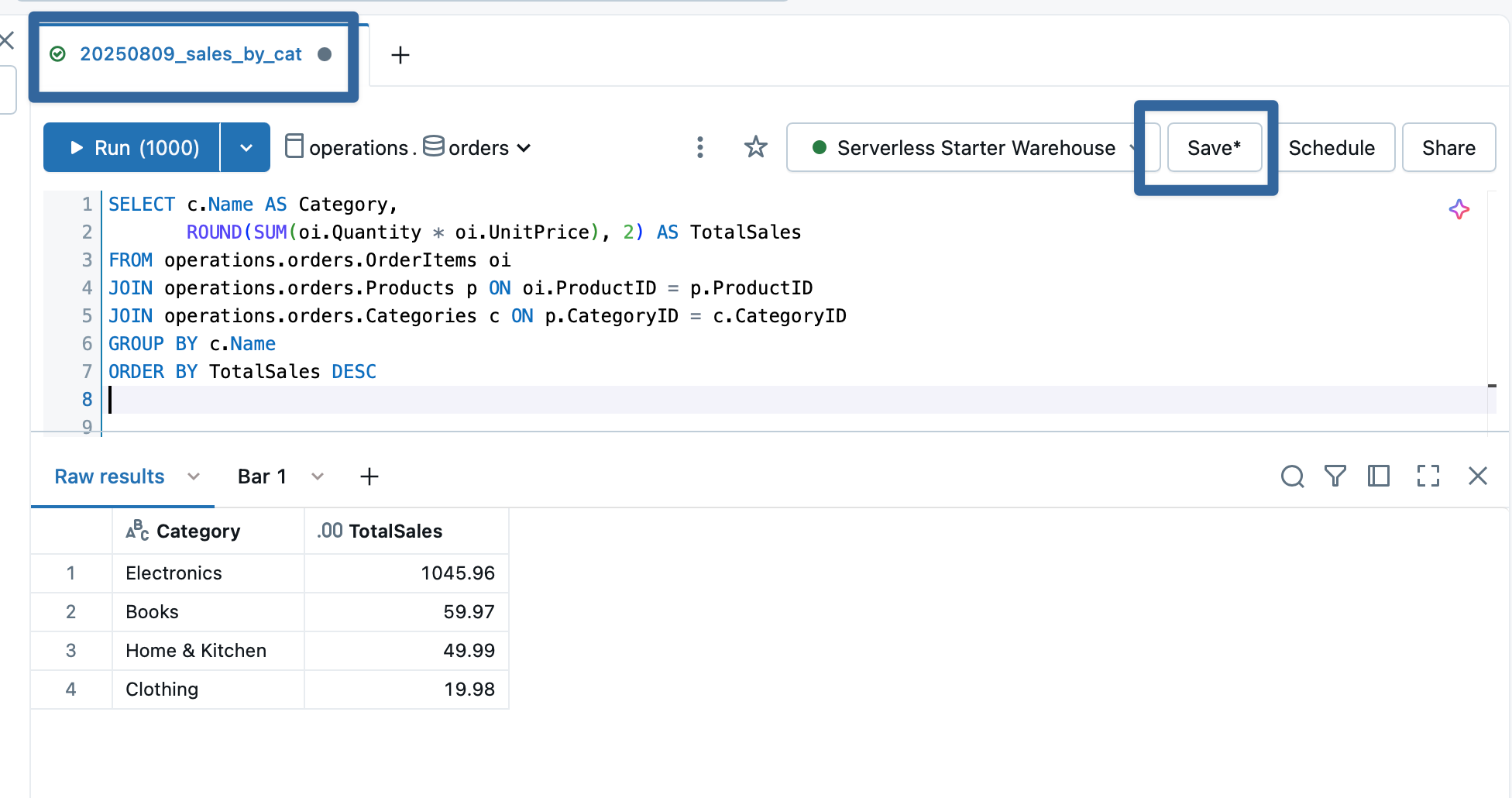
You can see in the UI that I’ve named my query - just click on the tab to name it whatever you’d like. You can see the ‘Save’ button has an asterisk; I haven’t saved this query yet, but when I do, I’ll get a popup screen asking me where it should go in the Workspace directories:

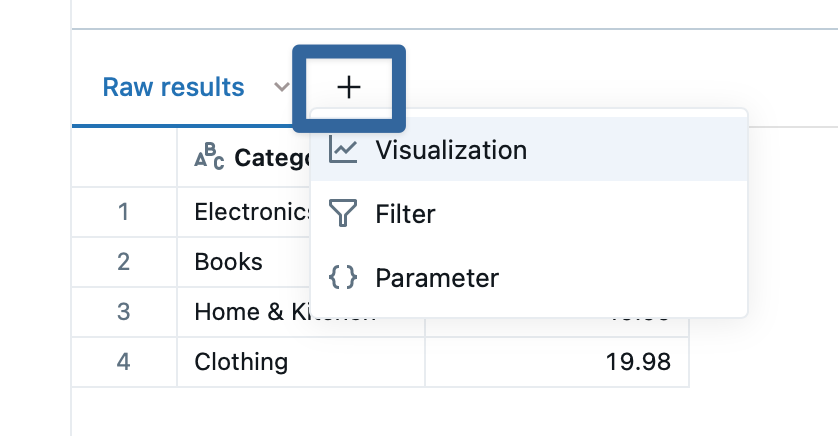
This should be plenty to get you exploring on your own for now, but I’ll leave you with one final morsel - you can build some light visualizations right into the results by clicking the ‘+’ button:
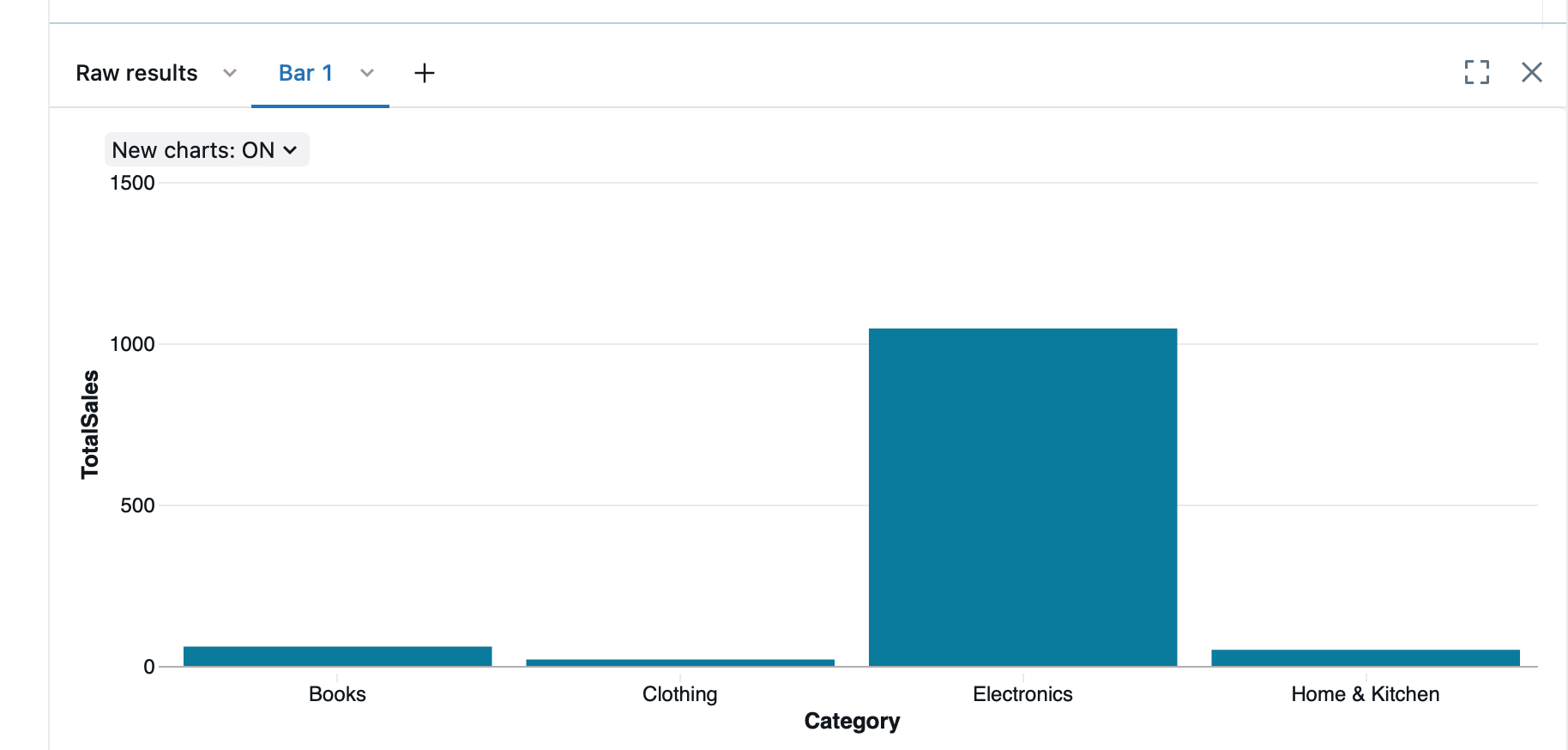
These mini visualizations can later be used in dashboards for reporting purposes. Databricks is spending no small effort polishing their dashboarding tools, making refinements and automations - it’s actually a little difficult to stay on top of the changes as they roll out2. More on these features to come - if you’re new to SQL and you were afraid to dip your toes in, between Databricks Free Edition and the cut-and-paste code I’ve given you above3, you have everything you need to get going.
The “USING DELTA” qualifier likely isn’t necessary, particularly with Databricks Free Edition, but it’s a nice-to-have. It’s a bit of inside baseball, but how stuff is stored on the disk is different than how you see it in Databricks. You see catalogs, schemas, and tables, but in reality, your data is copied into files written to a disk drive somewhere in something called a ‘metastore’. In a company setting, this is likely to be in AWS S3 buckets or Azure Storage. What Databricks is storing is files, and then another ‘meta-file’ to keep track of what data is where and transactions; it then abstracts this to show you a database. Different paradigms and solutions can use different file types - Delta Lake uses parquet, while other paradigms like Hadoop and Iceberg can use parquet, avro, and more. There are other options, and you may find particular needs to indicate other files types (e.g. you are trying to create a table for selecting based on .csv files that land in a location but you don’t want to formally copy them into your metastore), but 99 times out of 100, you’ll be storing a ‘managed’ table with USING DELTA.
And, unfortunately, similar to a previous footnote in another post about multiple uses of terms, ‘dashboards’ are all over Databricks. There’s SQL Dashboards, based on the old Redash framework (which I hear Databricks is reworking…?), Notebook Dashboards, and Notebook Legacy Dashboards, and each one has it’s own quirks, limitations, and uses.
Oh, fine. Here’s some more reporting queries for you:
Top 5 Customers by Spend
SELECT cu.Name AS Customer,
       ROUND(SUM(o.TotalAmount), 2) AS TotalSpent
FROM operations.orders.Orders o
JOIN operations.orders.Customers cu ON o.CustomerID = cu.CustomerID
WHERE o.Status != 'Cancelled'
GROUP BY cu.Name
ORDER BY TotalSpent DESC
LIMIT 5;

Orders Without Payments
SELECT o.OrderID, cu.Name AS Customer, o.Status, o.TotalAmount
FROM operations.orders.Orders o
JOIN operations.orders.Customers cu ON o.CustomerID = cu.CustomerID
LEFT JOIN operations.orders.Payments p ON o.OrderID = p.OrderID
WHERE p.OrderID IS NULL AND o.Status != 'Cancelled';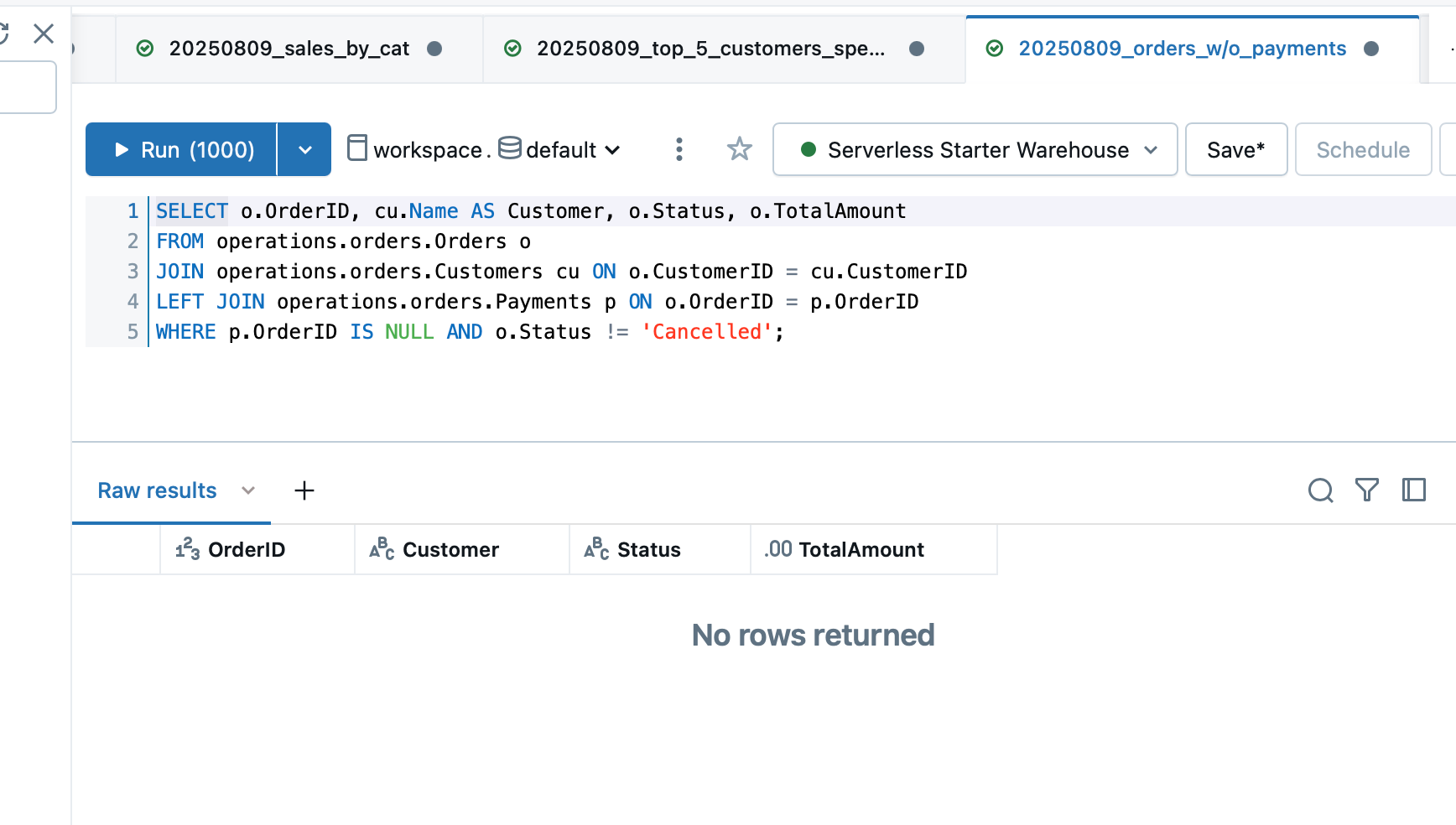
Product Sales Ranking
SELECT p.Name AS Product,
       SUM(oi.Quantity) AS UnitsSold,
       ROUND(SUM(oi.Quantity * oi.UnitPrice), 2) AS Revenue
FROM operations.orders.OrderItems oi
JOIN operations.orders.Products p ON oi.ProductID = p.ProductID
GROUP BY p.Name
ORDER BY Revenue DESC;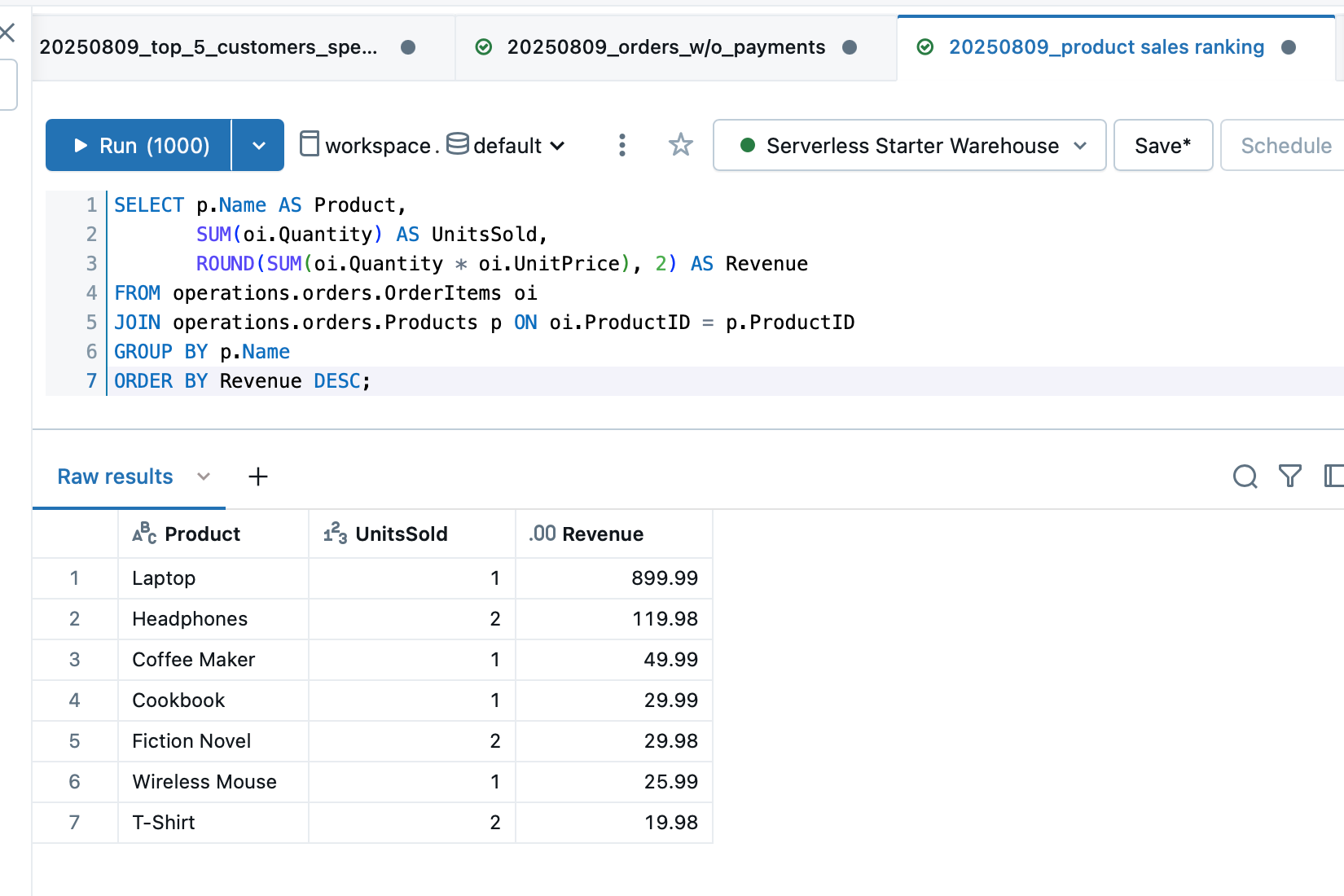
What can I say? I live to give.